


Building a website used to require quite a bit of work.
You needed a domain, hosting, a website builder, a theme, and sometimes a developer to put everything together. Even with beginner-friendly platforms like WordPress, there was still a learning curve.
Things are changing, though.
AI tools are making it easier for people to turn their ideas into actual websites without spending hours writing code or figuring out complicated settings.
I’ve been exploring different AI tools for building websites, and one of the newer options worth looking at is Bluehost AI Builder.
Instead of starting with templates or dragging and dropping elements around, you simply describe the website or web app you want. The AI takes your instructions, generates a first version, and lets you make changes through a conversation.
Sounds interesting, right?
For this article, I’m using it to create a personal portfolio website that introduces me, showcases my services, and gives potential clients a way to contact me.
Let’s look at how Bluehost AI Builder works, what you can build with it, its features, pricing, and whether it’s worth trying.
Disclosure: This article is sponsored by Bluehost. It contains affiliate links, which means I earn a commission if you make a purchase through my links, at no additional cost to you.
What Is Bluehost AI Builder?
Bluehost AI Builder is an AI-powered website and web app builder from Bluehost.
It allows you to create websites and web applications using simple text instructions instead of writing code.
For example, you could tell it:
“I want a professional website for my photography business with a portfolio, service packages, an about page, and a contact form.”
The AI understands your requirements and starts creating the website.
You can also upload your logo, photographs, and other images to help it understand your brand. If you have a website whose design you like, you can share that as inspiration.
Once the initial version is ready, you can continue chatting with the AI to change the layout, add sections, update content, or introduce new functionality.
You don’t need to know HTML, CSS, JavaScript, or any other programming language to get started.
The interesting part is that Bluehost AI Builder isn’t limited to traditional websites. You can also create web apps with features like forms, bookings, user accounts, and admin panels.
What Can You Build With Bluehost AI Builder?
This is where things get interesting.
Bluehost AI Builder supports different types of websites and web applications, depending on what you’re trying to create.
Here are some examples.
1. Business Websites
If you’re running a small business, you can create a professional website to introduce your company, showcase your services, share business information, and collect inquiries.
For example:
- Digital marketing agencies
- Consulting businesses
- Local service providers
- Photography studios
- Restaurants and hospitality businesses
- Freelancers and independent professionals
You can ask the AI to create service pages, contact forms, image galleries, and other sections based on your requirements.
2. Personal Websites and Portfolios
This is actually what I’m using it for.
You can create a personal website to introduce yourself, showcase your work, highlight your skills, and make it easier for potential clients or collaborators to reach you.
It’s useful for:
- Freelancers
- Designers
- Developers
- Writers
- Consultants
- Content creators
- Entrepreneurs
You can describe your preferred design, upload your portrait, and tell the AI what sections you want.
3. Landing Pages
Need a simple landing page for a product, service, event, or marketing campaign?
You can describe the purpose of the page and ask the AI to create a suitable layout with headlines, descriptions, calls to action, and inquiry forms.
This can be useful for testing business ideas, promoting services, or collecting leads.
4. Blogs and Content Websites
You can also create blogs and content-focused websites.
For example, you could build a personal blog, a business resource website, or a platform where you share information about a particular industry.
However, if you’re planning to run a serious content-heavy blog with advanced publishing requirements, WordPress may be a better long-term option.
5. Booking Websites
Bluehost AI Builder can also create booking-related web apps.
You could use this for appointment requests, scheduling, or managing bookings for a service business.
This could be useful for consultants, service providers, and businesses that work with appointments.
6. Customer Portals
Need a private area where customers can access information or manage their accounts?
You can describe the portal you want and ask the AI to build the necessary functionality.
7. Quote Request Forms and Directories
You can also build applications that collect quote requests, manage submissions, or organize directory listings.
Other possibilities include internal business tools and simple workflow applications.
The important thing to understand is that Bluehost AI Builder supports both websites and browser-based web apps. It does not create native Android or iOS applications for app stores.
How to Build a Website With Bluehost AI Builder
Getting started is relatively straightforward.
You don’t need to install software or configure a complicated development environment.
Here’s how the process works.
Step 1: Visit Bluehost AI Builder
First, visit Bluehost AI Builder.
You can start with the free plan without entering credit card details.
Once you’re inside, you’ll find an option to describe the website or application you want to create.
Step 2: Describe Your Website Idea
This is probably the most important step.
Instead of choosing a template and customizing everything manually, you describe what you want.
For example, here’s the prompt I’m using for my personal website:
“I want to create a modern, minimalist personal portfolio website for an independent entrepreneur, website developer, digital marketer, and blogger. Include an introduction, about section, professional services, selected projects, and contact information. Use clean typography, generous whitespace, and a premium editorial-style design.”
You can be as detailed as you want.
You can also upload your logo, personal photographs, and other reference images to help the AI understand your requirements.
Step 3: Answer the AI’s Questions
Depending on your prompt, the AI may ask a few questions before generating the website.
These questions help it understand your preferences and requirements.
For example, it might ask about your preferred design style, what visitors should do first, or the type of website you’re creating.
Answer these questions to help it generate a more relevant first version.
Step 4: Let AI Build Your Website
Once you’ve provided the information, the AI starts generating your website.
You can watch the process and see your website take shape.
Depending on the complexity of your requirements, the time needed to generate the first version can vary.
Step 5: Refine Your Website Through Chat
Your first version doesn’t have to be perfect.
You can continue chatting with the AI to make changes.
For example:
- Change the website’s color palette.
- Make the navigation menu simpler.
- Add a new services section.
- Change the homepage headline.
- Update the typography.
- Add a contact form.
- Improve the mobile layout.
Instead of manually editing every element, you simply describe the changes you want.
This conversational editing experience is one of the main things that makes AI Builder interesting.
Step 6: Publish Your Website
Once you’re happy with the result, you can publish your website.
The free plan lets you publish using a Bluehost AI Builder subdomain.
If you want to connect your own domain, you’ll need a paid plan.
You can also continue making changes after publishing. Just remember to publish your updates when you’re ready for visitors to see them.
My Experience Building a Personal Website With Bluehost AI Builder
As someone who has been building websites since 2018, I was particularly interested in seeing how this approach compares with the traditional website development process.
For this project, I decided to create a personal portfolio website.
I wanted something simple that could introduce me, showcase my services, highlight my professional work, and make it easier for potential clients to contact me.
I didn’t want to spend hours choosing a theme, configuring plugins, or manually arranging every section.
So I started by describing the website I wanted.
I included details about my background, the services I offer, the design direction, and the sections I wanted on the homepage.
I also wanted the website to feel like a personal brand rather than a generic business website.
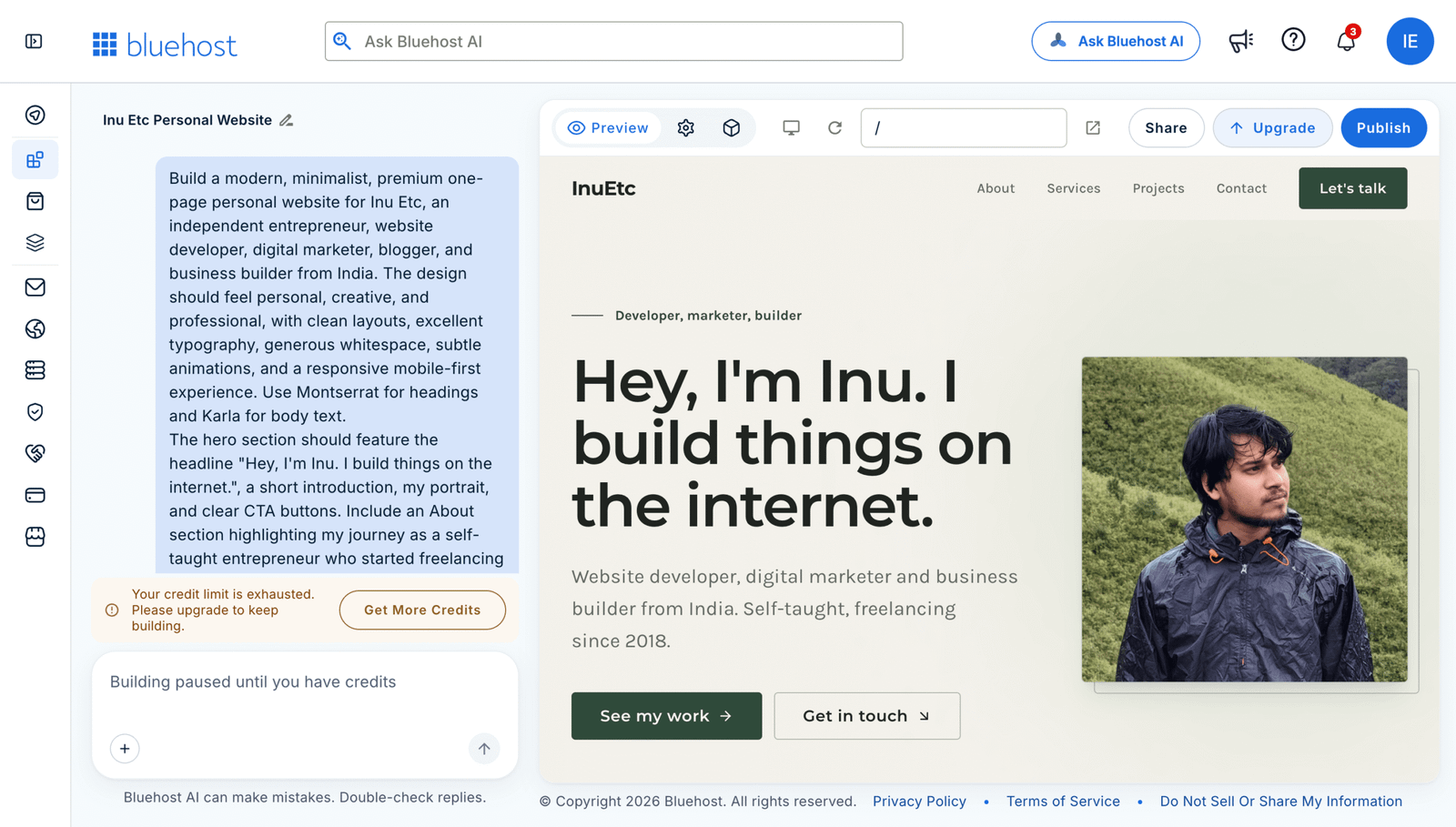
My initial prompt and the website generation process in Bluehost AI Builder
One thing I particularly like about this approach is that you can explain your requirements in everyday language.
You don’t need to translate every design decision into technical instructions.
After the initial generation, I could review the website and decide what needed to change.
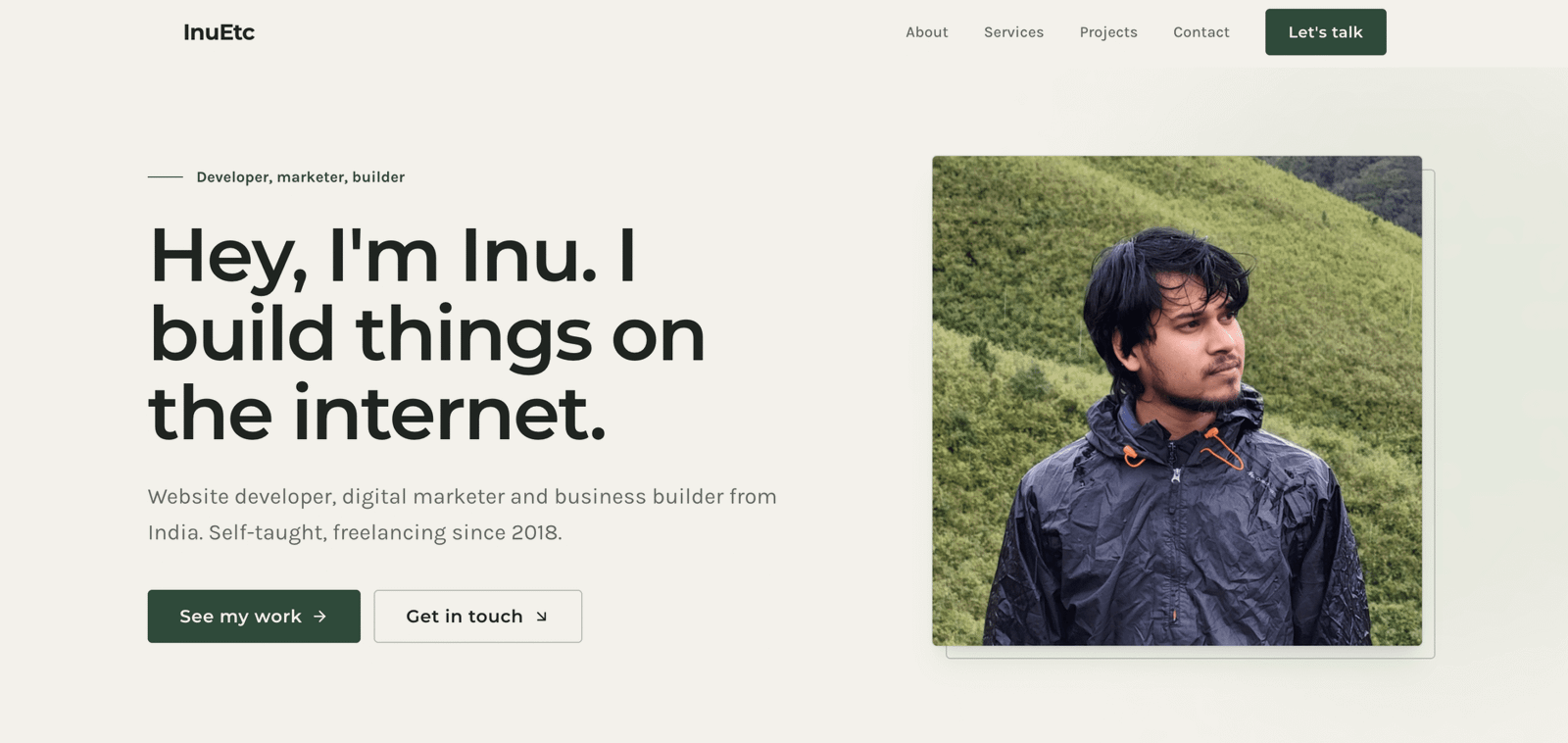
Preview of my personal portfolio website generated with Bluehost AI Builder
The next step was refining the design.
For a personal portfolio, small details matter. Typography, spacing, the hero section, service descriptions, and navigation all contribute to the overall experience.
Being able to request changes through chat makes the process more approachable, especially if you don’t have much experience with website development.
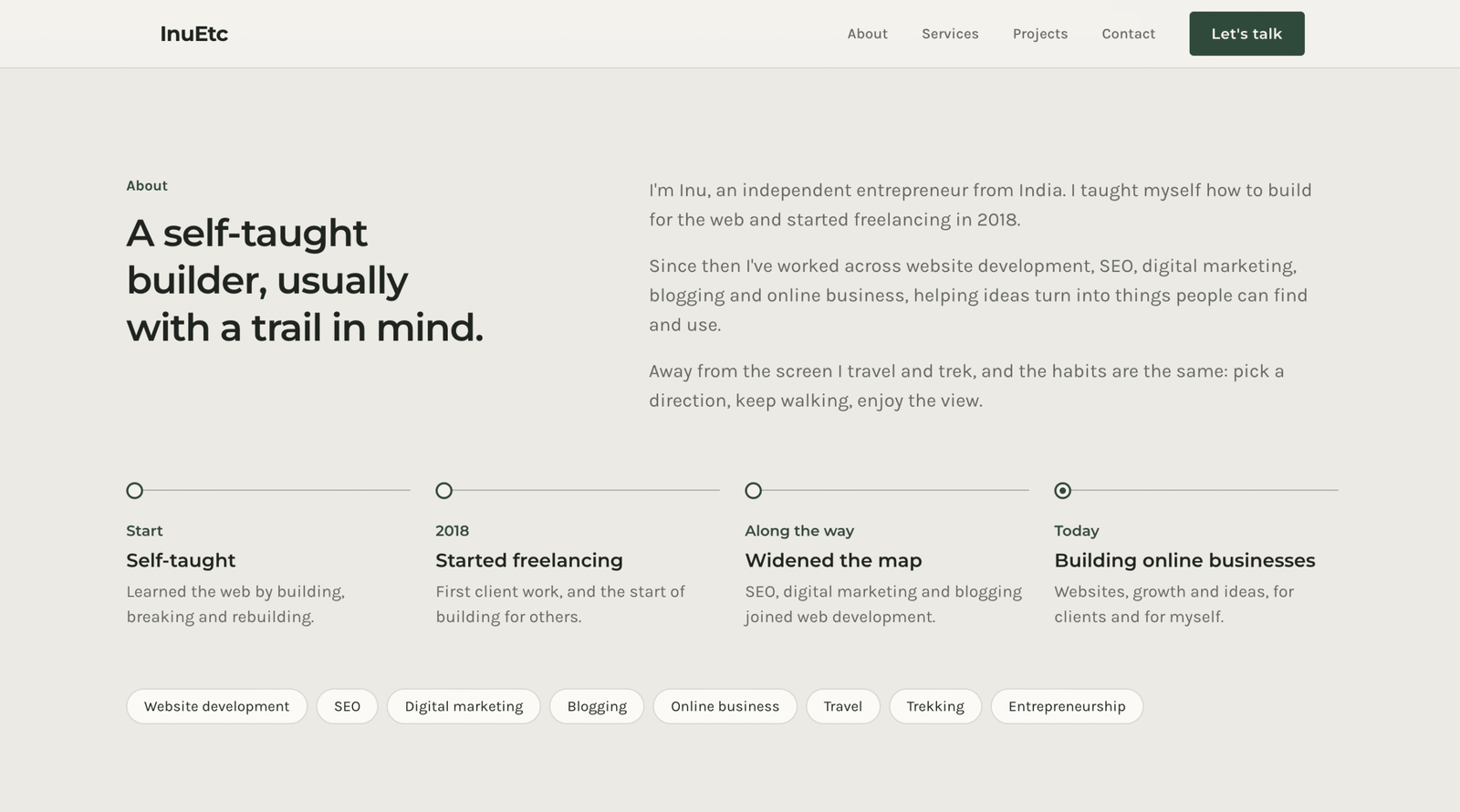
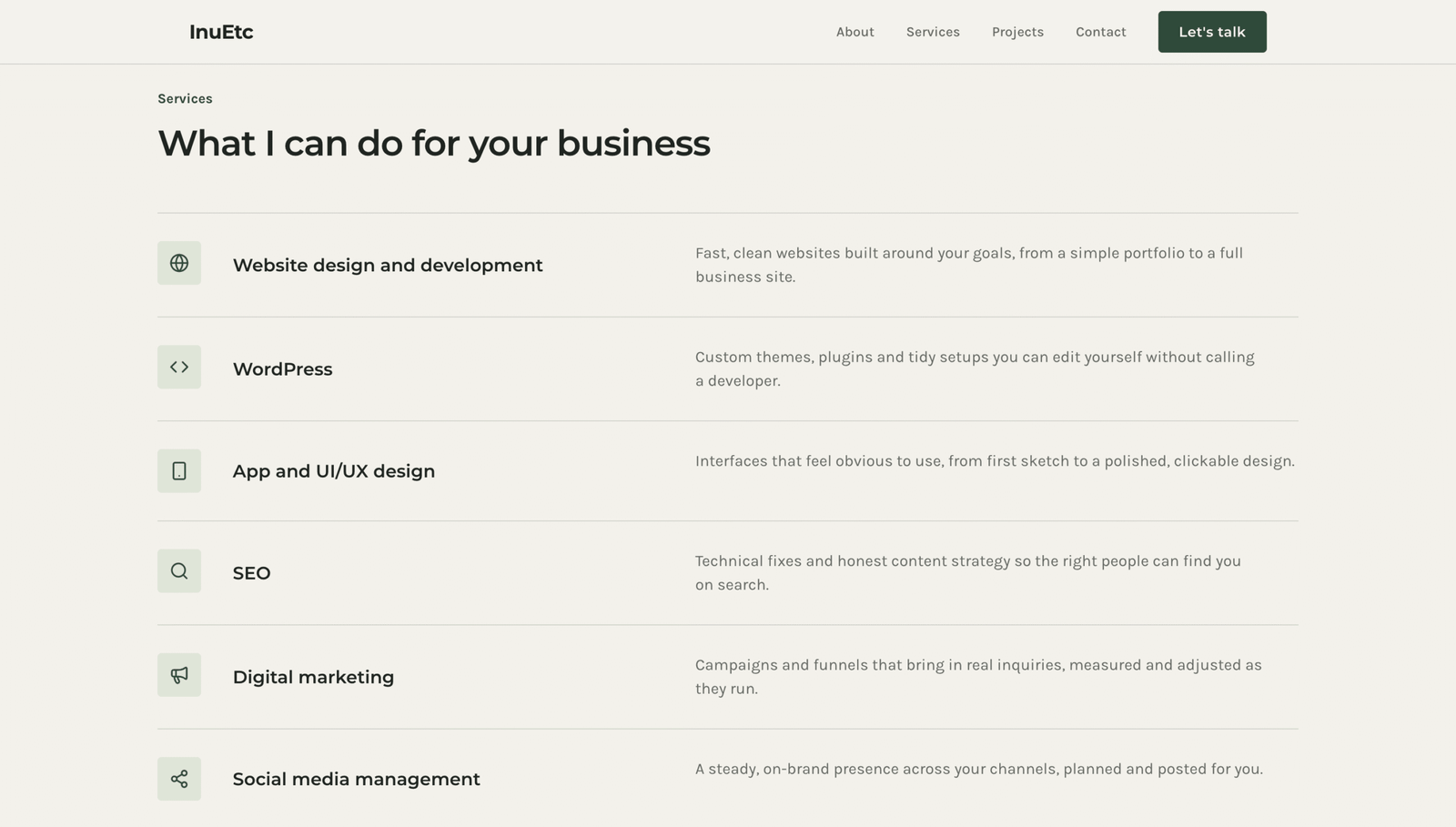
A few sections from the final version of my personal website:
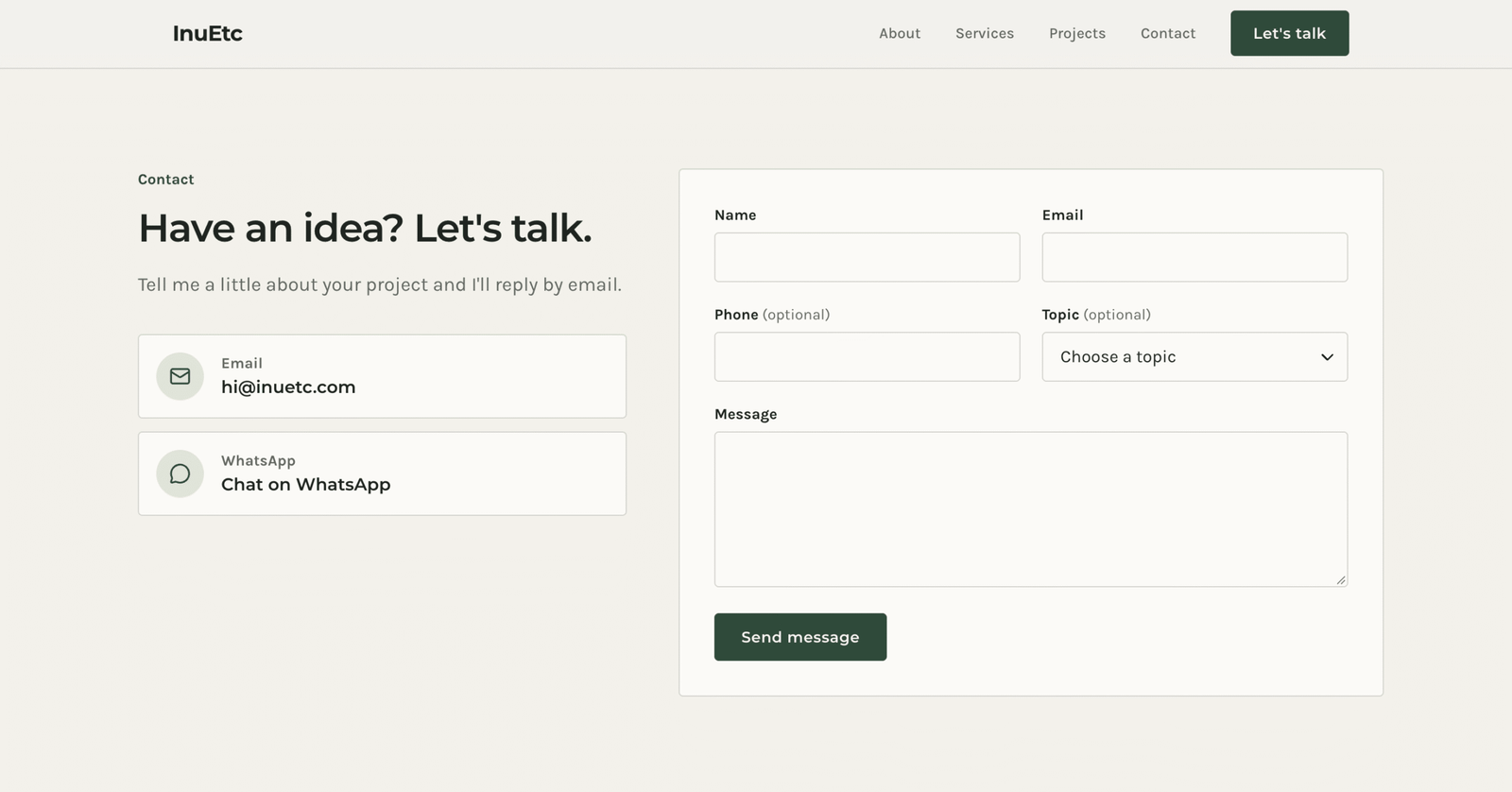
Of course, AI-generated websites still need human input.
You should review the content, replace placeholder images, check every link, test the contact form, and make sure the website communicates your actual business or personal brand.
I wouldn’t recommend publishing anything without reviewing it first.
But if your goal is to get a first version of your website online without starting from scratch, this is an interesting approach.
Bluehost AI Builder Features Worth Knowing About
Apart from generating websites through prompts, there are a few other features worth mentioning.
1. No-code website creation
You don’t need programming or design experience to get started. You can describe your requirements and let the AI handle the initial development.
2. Website and web app creation
You can create business websites, portfolios, landing pages, blogs, booking applications, customer portals, directories, and internal tools.
3. Conversational editing
You can continue improving your website by chatting with the AI instead of manually editing everything.
4. SEO-ready page elements
Bluehost AI Builder can generate page titles, descriptions, headings, and image alt text. These provide a useful starting point for on-page SEO, although you’ll still need to review and optimize them.
5. Responsive layouts
Websites and web apps are designed to work across desktop, tablet, and mobile screens. You should still test your actual published website on different devices.
6. Hosting included
Bluehost includes hosting with its AI Builder plans. Your published website stays online without consuming your building credits.
7. 24/7 human support
Bluehost also advertises round-the-clock human support, including on its free plan.
This is useful if you need assistance with your hosting, domain, or other account-related questions.
Bluehost AI Builder Pricing: Is There a Free Plan?
Yes!
One of the interesting things about Bluehost AI Builder is that you can start without paying anything.
Here’s a quick overview of the advertised pricing.
| Plan | Monthly price | AI credits |
|---|---|---|
| Free | $0 | 5 daily, up to 30 per month |
| Lite | $20/mo | 100 per month |
| Standard | $40/mo | 200 per month |
Prices are in USD. Check the official website for current pricing and billing terms.
What Do You Get With the Free Plan?
The free plan includes:
- No credit card required.
- 5 AI credits per day, up to 30 per 30-day period.
- Website and web app creation.
- Forms and data storage.
- Booking and scheduling features.
- User accounts and roles.
- Admin panels.
- Hosting.
- 24/7 human support.
You can publish your website using a free Bluehost AI Builder address.
However, connecting your own domain requires a paid plan.
How Do AI Credits Work?
Bluehost uses a credit system for building and editing.
Generally, each message that asks the AI to create, change, or fix something uses one credit.
For example, asking it to change your homepage headline or add a new section will use a credit.
However, answering the AI’s initial clarification questions, previewing your website, publishing it, and keeping it online don’t consume building credits.
This is an important distinction.
Even if you run out of credits, your published website stays online. You simply need to wait for credits to refresh or purchase additional credits before making more changes.
If you’re just experimenting or building a simple personal website, the free plan is a good place to start.
What About Online Stores and E-commerce?
There’s one important limitation worth mentioning.
Bluehost AI Builder does not currently support e-commerce functionality such as online product sales and checkout.
So, if your main goal is to create an online store, this isn’t the product you should choose.
Instead, Bluehost has a separate product called Bluehost AI Store.
It’s designed specifically for e-commerce businesses and includes features for product catalogs, shopping carts, payments, shipping, and order management.
The two products serve different purposes, so make sure you choose the right one for your project.
Bluehost AI Builder: Pros and Cons
After looking at its features, here’s how I’d summarize the main advantages and limitations.
Pros
- No coding or technical knowledge required.
- Free plan available without a credit card.
- Can create both websites and web apps.
- Simple conversational editing.
- Supports different types of business websites and portfolios.
- Hosting is included.
- Published websites don’t consume AI credits.
- 24/7 human support is available.
Cons
- The free plan uses a limited number of AI credits.
- Connecting a custom domain requires a paid plan.
- Every requested change uses a credit.
- AI-generated content and layouts still need human review.
- No e-commerce functionality in AI Builder.
- It doesn’t create native Android or iOS applications.
Who Should Use Bluehost AI Builder?
I think Bluehost AI Builder is worth exploring if you want to get a website or simple web application online without dealing with traditional development.
It could be particularly useful for:
Freelancers and independent professionals: Build a portfolio, introduce your services, and give potential clients a way to contact you.
Small business owners: Create a professional online presence without hiring a developer for an initial website.
Consultants and service providers: Build landing pages, booking websites, and quote request applications.
First-time entrepreneurs: Experiment with business ideas and create an initial online presence without investing heavily in development.
Non-technical founders: Build simple web apps and internal tools using natural-language instructions.
However, if you need a highly customized application, complex integrations, advanced e-commerce functionality, or complete control over your code and infrastructure, you may need a different solution or professional development support.
Final Thoughts: Is Bluehost AI Builder Worth Trying?
I think tools like Bluehost AI Builder are making website creation more accessible.
You don’t necessarily need to learn coding or hire someone just to get a basic website online anymore. You can start with an idea, describe what you need, and use AI to create an initial version.
That doesn’t mean developers are becoming irrelevant. Building a good website involves much more than generating a few pages. Strategy, user experience, content, performance, accessibility, security, and ongoing maintenance still matter.
But for freelancers, small business owners, and people experimenting with new ideas, having a tool that handles much of the initial setup can be useful.
What I particularly like about Bluehost AI Builder is that it goes beyond simple website generation and also supports web applications.
If you’re curious, I’d suggest starting with the free plan and building something small. You can experiment without entering your credit card details.
Ready to give it a try?
Try Bluehost AI Builder for free. It’s $0 to start, no credit card required. Paid plans from $20/mo.
Thanks for reading this article. 💚
If you loved what you read, could you buy me a cup of coffee? It’s okay if you can’t right now.
If you have any questions or would like to work with me, or want help with content creation, website design, blogging, or digital marketing — feel free to contact me.
Take care.
Love, love!

Leave A Comment